The Forge — the journal that pays you back
A trading journal that records the decision, not just the result.
Most journals are a spreadsheet with better fonts: entry, exit, P&L, done. Sage's journal records what you will need six months from now — the stop you had at fill, the setup you were trading, the session, your state going in, the chart as you saw it — and measures all of it in R, so a $40 win and a $4,000 win at the same risk read as the same trade. Logging takes seconds; the review is where you get paid.
In the app: The Forge · All Trades · Timeline · Calendar
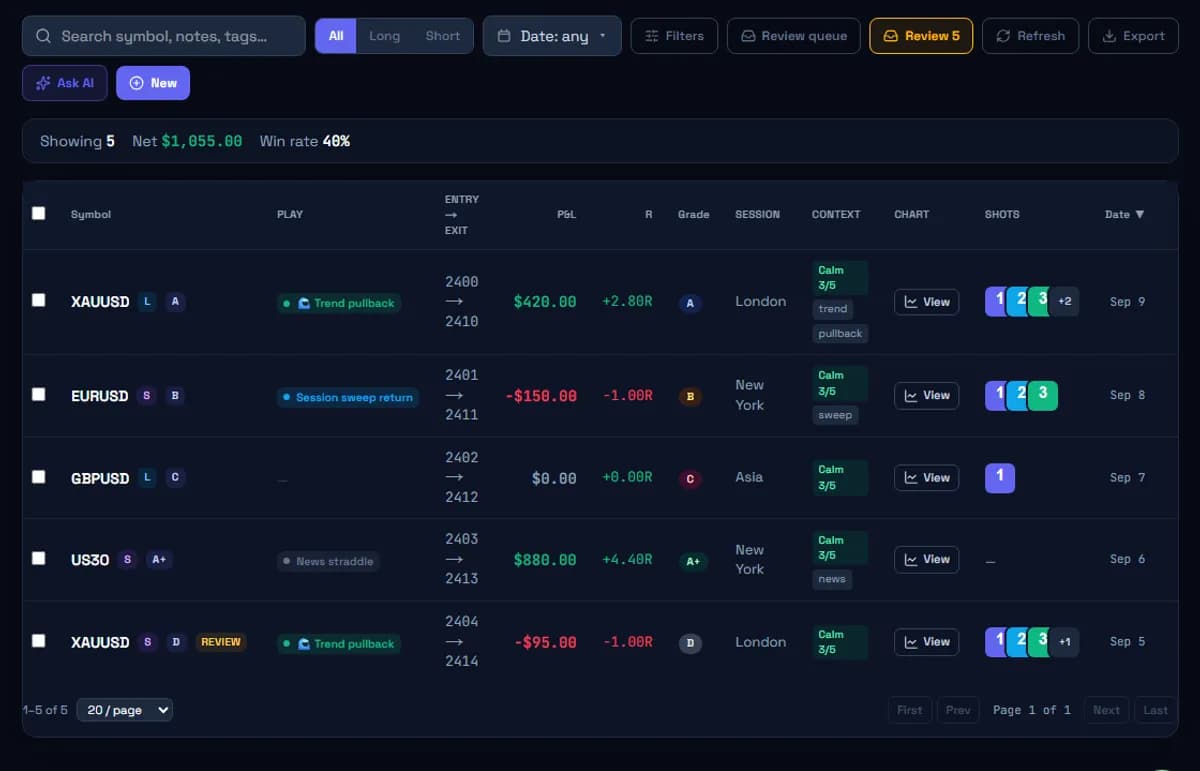
Shown with sample data.
What it is
Trading Journal, concretely.
Fast
The Forge: a trade in under a minute
A guided entry that asks for what matters — instrument, side, entry, stop, target, outcome, setup, session, tags, a screenshot, a sentence of reasoning — and shows you what changed in your stats the moment you save. Streaks, milestones and the occasional confetti, because a journal you enjoy is a journal you keep.
Honest
Everything in R
The initial stop is a first-class field, so every trade has an R-multiple and every setup, session and tag has an expectancy. Money is shown too; R is what the analysis runs on.
Complete
Tags, plays, sessions, screenshots
Tag with your own vocabulary, link each trade to a play in your Playbook, record the session automatically from the time, and keep the chart as you saw it. Bulk-assign trades to a play when you name a setup later.
Automatic
Sync from MetaTrader 5, free
A read-only Expert Advisor in your own terminal posts closed positions to your journal — including the stop that was active at fill. No broker password, no paid bridge. CSV import from MT4, MT5, cTrader and TradingView as well.
Visible
Timeline and calendar
A day-by-day feed of your trades and notes, and a P&L calendar with a year heatmap so a good month and a bad week are visible at a glance.
Filterable
All Trades, sliced any way
Filter by date, symbol, side, session, setup, play and tag, select many and assign them at once, and open any screenshot from the table.
How it works
How a trader actually uses it.
- 01
Log the trade while it is fresh
From The Forge in a few taps, from the full form when you want every field, or automatically from MetaTrader 5. Record the stop you had at fill — the one field that makes everything else measurable.
- 02
Name the setup and the state
Tag it, link it to a play, note how you felt going in. Two sentences at entry beat two paragraphs a week later, because memory rewrites the story to fit the result.
- 03
Review by category, weekly
Not trade by trade. Which setups and sessions made and lost R this week, which rules were broken and what they cost, and one thing to change — with sample sizes next to every number.
- 04
Let the numbers argue with your memory
Analytics and Edge Lab read what the journal recorded: expectancy by slice, the R:R simulator, behavioural flags. The journal is the evidence; the rest of the platform is the review.
What it is, and isn't
Straight about the limits.
It does
- ✓Manual logging, guided (The Forge) or full-form; CSV import; free MetaTrader 5 auto-sync
- ✓R-multiples from the stop at fill; tags, plays, sessions, screenshots, notes, mistakes costed in R
- ✓Timeline, calendar with year heatmap, a filterable All Trades table
- ✓Separate books for live trades and backtest trades, with the same analytics on each
It doesn't
- ✕Execute trades or connect to a broker for order placement
- ✕Sell signals, strategies or a supplied setup vocabulary — the tags and plays are yours
- ✕Pool, sell or train anything on your data
- ✕Tell you a setup works; it shows the count and the interval and lets you decide
Trading Journal, answered.
- Is the trading journal free?
- Yes. Logging, import, MetaTrader 5 sync, analytics, backtesting and the rest of the workspace are free, with no card required.
- Which markets can I journal?
- Any: forex, gold and metals, indices, futures, stocks, crypto. The journal is instrument-agnostic; the analysis works in R, which is the same in every market.
- Can I import my existing trades?
- Yes — CSV from MT4, MT5, cTrader and TradingView, or a generic CSV. Include the stop if you have it, so historical trades can be R-scored too.
- How is this different from a spreadsheet?
- The recording is similar; the review is not. Grouping by setup and session in R, confidence intervals on every rate, screenshots attached to trades, automatic behavioural detection and a sync from your terminal are the parts a spreadsheet makes you build and maintain yourself.
- Does it work on a phone?
- Yes. The Forge, the tables and the analytics are built for a phone, and the backtesting workspace has its own phone layout.
Keep going
- FeatureTrading PlaybookA trading playbook where each setup is a written play: thesis, rules, where it applies, how much it risks, and a life from idea to testing to live to retired. Pre-register the idea, link backtests and live trades to it, and see tested-vs-live results with per-rule adherence.
- FeatureMetaTrader 5 Automatic Trade LoggingAuto-log every closed MetaTrader 5 trade to your journal with a free Expert Advisor that runs in your own terminal. It never asks for broker credentials, cannot place or modify orders, and captures the stop that was active at fill — the field statements leave out.
- FeatureTrading Analytics & Edge AnalysisTrading performance analytics that read what your journal recorded: expectancy by setup, session and tag with confidence intervals, an exact R:R simulator on real 1-minute price paths, Sharpe, Sortino, SQN, Kelly, drawdown and Monte Carlo ruin probability. Free.
- GuideHow to keep a trading journal that actually changes your tradingWhat to record on every trade, what to skip, how to review a week, and why the stop you had at fill matters more than the P&L. A practical guide for discretionary traders.
- GuideHow to choose a trading journal — a checklist, not a rankingSpreadsheet, notebook or app? The questions to ask any trading journal before you commit: does it record the stop at fill, measure in R, show sample sizes, import your broker's trades, and keep backtests separate from live results.
- Free toolRisk/reward calculatorEnter entry, stop and target to get the risk-to-reward ratio, the R-multiple of any exit, the break-even win rate that ratio needs, and expectancy per trade. Free, no sign-up.
See every module on the features overview.
Try trading journal on your own trades.
Create your workspace in ten seconds. Everything on this page is free, with no card and no paid tier.
Free · no card · your data stays yours